 ☰
☰Getting Started
Overview
This section provides the technical guidance required to integrate with PPC e-Money Services PSD2 APIs. It covers onboarding, environment configuration, authentication and consent, sandbox behaviour, HTTP request signing, error handling and key terminology used across the platform. The content is intended for external developers and licensed Third-Party Providers (TPPs) integrating with PPC EMI.
Onboarding
1. Explore our APIs
Browse the available PSD2 APIs to understand what they offer and which ones support your use case. Documentation includes example requests, responses and prerequisites so you can quickly determine what to integrate.
2. Sign up and test in our sandbox
Create a developer account and register your application in the Developer Portal. During registration, you will also provide your organisation details and declare the PSD2 services you intend to use (AIS, PIS and/or PIIS).
Once registered, you receive a Client ID and Client Secret, which allow you to authenticate against the Sandbox environment.
The sandbox provides simulated data and controlled behaviour so you can:
Test OAuth2 authentication and consent flows.
Validate API integration and error handling.
Validate API integration and error handling.
3. Request production access
After completing your integration in the sandbox, you can request access to the production environment.
Your request goes through compliance and security checks. Once approved, you receive the credentials required for the live APIs.
4. Launch your product
With production access granted your application can interact with real customer data and initiate transactions with the user’s explicit consent. You can now deliver your solution to end users with full confidence and PSD2 compliance.
Technical guides
Environments and OAuth2
PPC e-Money Services provides separate sandbox and production environments, each with dedicated OAuth2 authorities and API base URLs. Environments are isolated and must be configured independently.
TPPs obtain access tokens using the client credentials grant, requesting one or more of the following scopes:
psd2:ais for Account Information Services
psd2:pis for Payment Initiation Services
psd2:piis for Funds Confirmation Services
Authentication and consent
PPC EMI uses OAuth2 for both backend and PSU-facing flows.
The client credentials grant is used for backend operations, such as consent creation and service-level API calls that do not involve direct PSU interaction.
The authorisation code grant with PKCE is used for PSU-facing flows. In these flows, the PSU is redirected to PPC EMI, authenticates and explicitly grants consent before access tokens are issued to the TPP.
OAuth2 and PSD2 flow diagrams
The following diagrams illustrate the main authentication and data-access flows supported by PPC EMI.
OAuth2 – Authorisation Code with PKCE
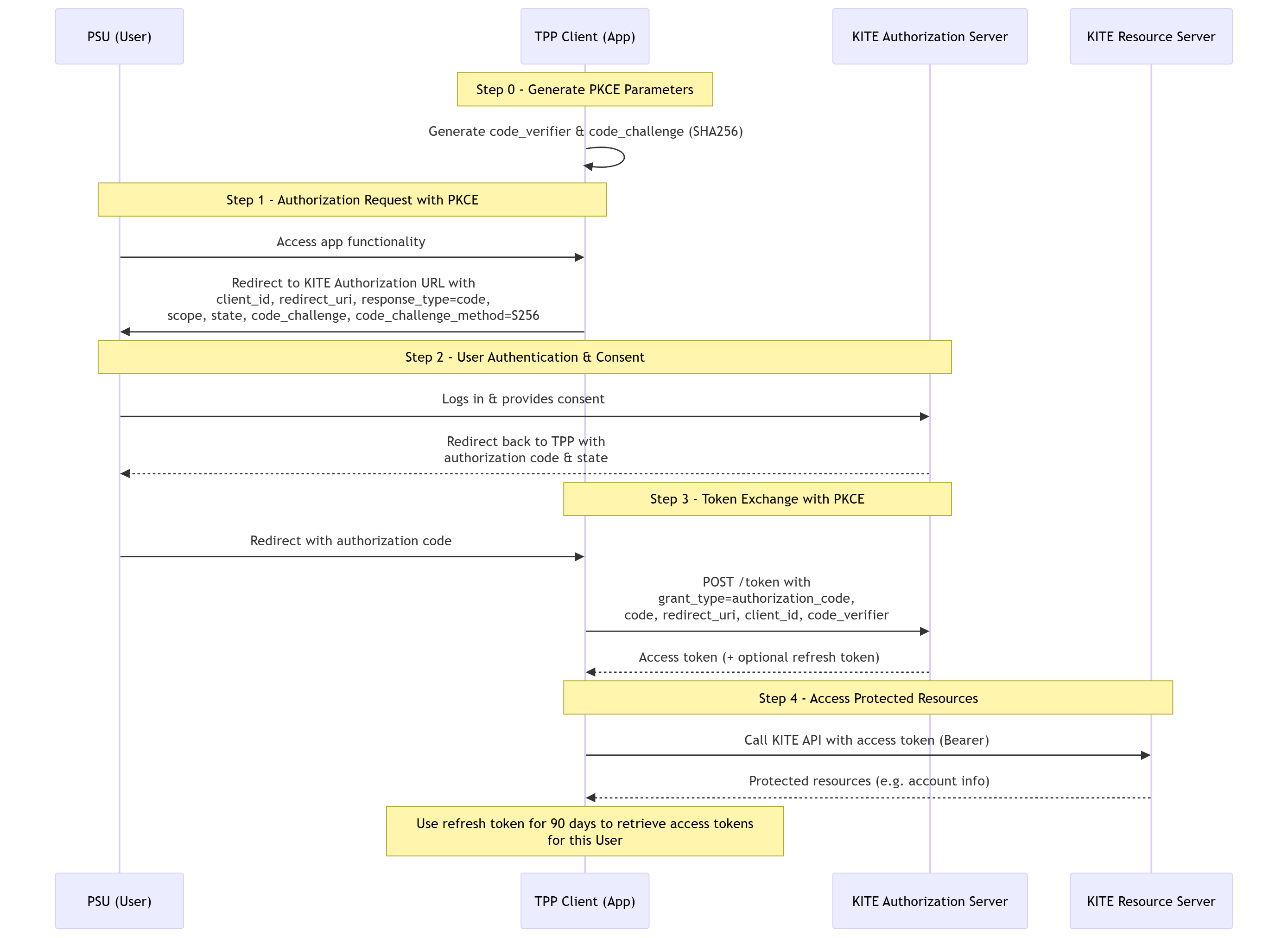
Kite PSD2 flow for AIS, including consent creation, PSU approval, token exchange and subsequent AIS API calls
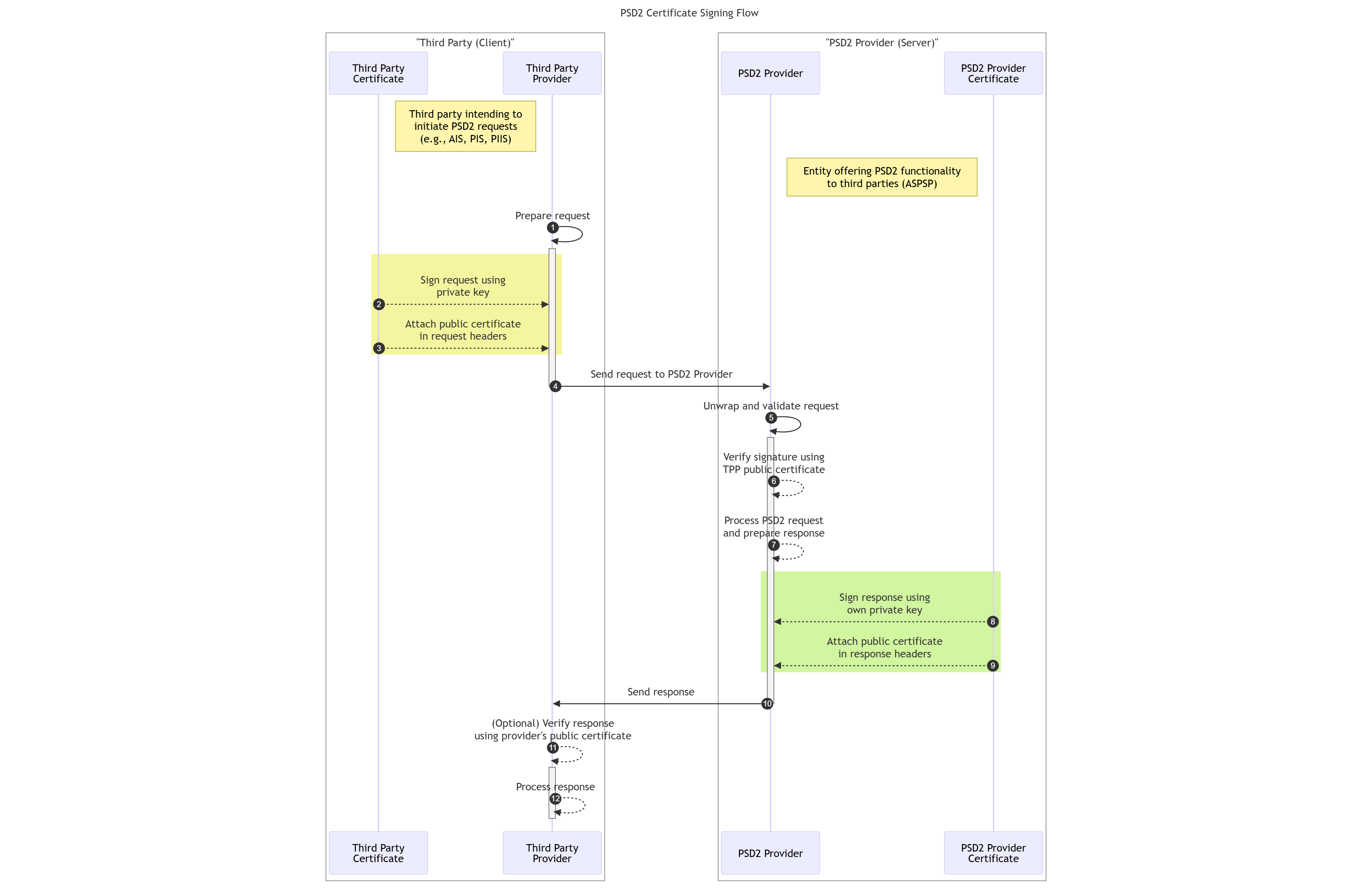
These diagrams clarify sequence, responsibilities and trust boundaries between TPPs, PSUs and PPC EMI.
Sandbox behavior
The Sandbox environment uses synthetic accounts, balances and transactions only. No real customer data or real payments are processed.
The following Sandbox-specific behaviors apply:
Mobile push approvals are disabled; PSU approvals are simulated on the consent screen
PIS payments always transition from PDNG to ACCC
Payment cancellations always return CANC
PIIS confirmations always return funds Available: true
These differences are intentional and allow predictable testing while remaining aligned with production semantics.
Signing PSD2 HTTP requests (HTTP signatures)
For applicable PSD2 APIs, TPPs must sign HTTP requests using their QSealC certificate.
The signature must cover selected headers, including:
Request-target
Digest
X-Request-ID
Created or X-Date
Each request must include the Signature and TPP-Signature-Certificate headers so PPC EMI can validate the certificate chain, request digest and cryptographic signature before processing the request.
Error handling and problem details
All APIs return standard HTTP status codes together with structured error payloads formatted as application/problem+json.
For troubleshooting and operational support, developers should log:
HTTP status code
X-Request-ID
Error code (if provided)
Human-readable message
Timestamp
Error codes
Common PSD2 error responses include:
400 – Invalid request or field format
401 – Missing or invalid access token
403 – Consent expired or revoked
404 – Resource not found
429 – Too many requests
500 – Internal server error
503 – Service temporarily unavailable
Each error response includes a human-readable message and, where applicable, additional error codes to support diagnosis and remediation.
Sandbox IP allowlisting
If your systems restrict outbound traffic, ensure that the PPC e-Money Services sandbox endpoints are allowlisted. The sandbox environment uses dedicated URLs and may be hosted on separate IP ranges from production. Requests from IPs that are not allowlisted will be blocked.
A full list of Sandbox IP addresses is available upon request during onboarding and will be published in the sandbox configuration section of the Developer Portal.
Common sandbox response patterns and errors
The sandbox uses synthetic accounts, balances and transactions only. It does not process real payments, but it reproduces PSD2 headers, error formats and typical validation rules.
To ensure predictable testing, the following behaviors and errors may occur:
Invalid or expired token returns 401
Missing required headers, including X-Request-ID, returns 400
Invalid signature or missing HTTP Signature headers returns 403
Unsupported or malformed PSU context headers returns 400
Unknown account identifiers return 404
PIS payment execution always follows PDNG to ACCC
Payment cancellation always returns CANC
Funds confirmation PIIS always returns funds Available set to true
These responses allow you to validate your error handling before moving to production.
Sandbox vs production behavior
The sandbox mirrors the structure of the production APIs, but contains important differences to ensure safe testing:
No real payments are executed.
All account data, balances and transactions are synthetic.
Mobile push approvals are disabled; PSU approvals are simulated on the consent screen.
SCA timings, user authentication steps and payment execution times do not reflect Production.
PIIS confirmations always return a positive value.
Do not use sandbox behavior to estimate real settlement times, SCA flows or production performance.
Troubleshooting checklist before contacting Support
To reduce investigation time and avoid unnecessary support tickets, verify the following for every PSD2 request:
You are using the correct environment URLs sandbox or production.
Your access token includes the correct scope psd2:ais or psd2:pis or psd2:piis.
Your X-Request-ID header is present, unique and properly formatted.
For APIs that require HTTP signatures, include Signature and TPP-Signature-Certificate headers and ensure the digest and certificate chain are valid:
Your request uses TLS 1.2 or higher.
Your redirect URIs and PSU return URLs match the values registered during onboarding.
You are not attempting to access production with sandbox credentials or vice versa.
Your organization and PSD2 permissions are correctly configured in the Developer Portal.
Capturing this information will significantly speed up support response times.
Additional notes for complete integration
Always store the X-Request-ID you send and the one returned in the response; mismatches help trace issues across systems.
When testing payments, use synthetic IBANs defined in the sandbox documentation.
When handling consent flows, validate that your application supports full redirect + PKCE logic as required by PPC EMI.
For periodic or bulk payment scenarios, ensure that you understand how sandbox simulates statuses and execution windows.
All error responses follow the application/problem+json format described in the “Getting started” section.
Profile and subscriptions
My profile: View and update your full name, email address and organization.
Security: Change your password to keep your account secure.
Close account: Request account closure if you no longer need access; this revokes subscriptions and removes sandbox access.
My subscriptions: View and manage sandbox and production subscriptions, including product name, environment, subscription name and status. Use the subscription detail view to show or regenerate keys. Keep subscription keys secret and never commit them to public repositories.
Glossary (key terms)
Access token – An OAuth2 token issued after successful authentication and consent, used to access protected APIs. Access tokens are short-lived.
AISP – Account Information Service Provider; a TPP authorized to access account and transaction data.
ASPSP - Account Servicing Payment Service Provider; the payment service provider that holds the PSU account and exposes PSD2 APIs. In this context, PPC EMI acts as the ASPSP.
Consent – Explicit permission granted by the PSU allowing a TPP to access account data or initiate a payment. Consent is captured via PPC EMI consent screens during the redirect flow.
PIISP – Payment Instrument Issuer Service Provider; a TPP authorized to confirm whether sufficient funds are available on the PSU’s account.
PISP – Payment Initiation Service Provider; a TPP authorized to initiate payments on the PSU’s behalf.
PSD2 – Revised Payment Services Directive; the EU regulatory framework governing open access to payment accounts and secure electronic payments.
Refresh token – An OAuth2 token that can be used (where supported) to obtain new access tokens during the lifetime of a consent.
Sandbox environment – A testing environment with synthetic data where no real payments are executed. Behavior is aligned with production, with documented differences.
TPP – Third-Party Provider; an authorized provider that accesses account data or initiates payments on behalf of the PSU under PSD2.
